 Translate
1. Opt-In Method
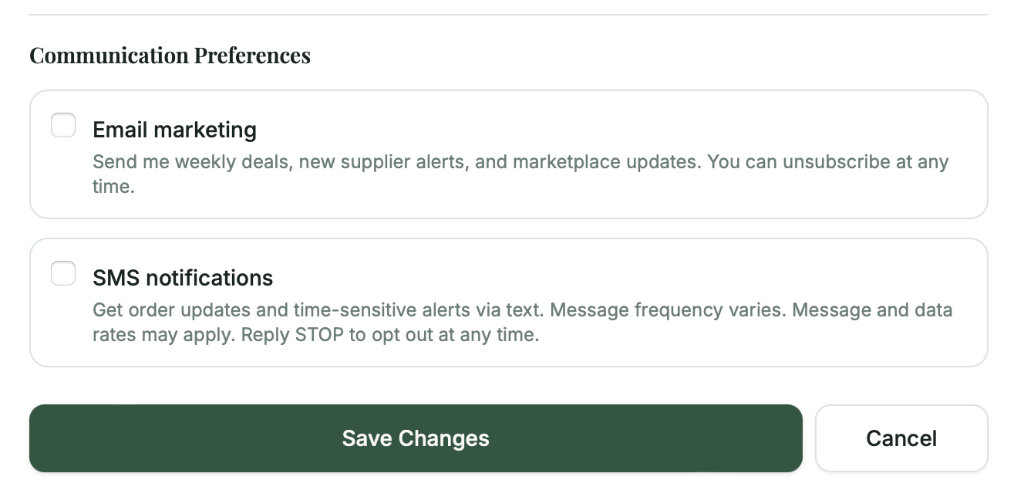
GreenSource collects explicit written consent via a web-based checkbox on the user profile settings page. The checkbox is unchecked by default and requires affirmative user action to enable SMS notifications.
Opt-In Location:
https://greensource.app/profile → Communication Preferences → SMS Notifications
Exact Opt-In Language Displayed to Users:
SMS notifications
Get order updates and time-sensitive alerts via text. Message frequency varies. Message and data rates may apply. Reply STOP to opt out at any time.
Screenshot — Communication Preferences section on the user profile page:
Twilio Compliance Note
SMS consent is collected independently and is not bundled with or conditioned upon acceptance of any other agreement (Terms of Service, Privacy Policy, or account registration). Links to legal documents appear separately in the Legal Agreements section of the profile page.
Users must also provide a mobile phone number in the adjacent input field after enabling the checkbox.
2. How Consent Is Stored
Consent is recorded in the User entity database with the following fields:
User Entity Fields:
- •
sms_opt_in: boolean— true when user checks the box - •
sms_phone: string— user-provided mobile number - •
updated_date: timestamp— when consent was granted/modified
Consent records are retained for the lifetime of the user account and can be audited via admin dashboard.
3. Approved Message Types
GreenSource sends only the following transactional/alert messages:
Order Notifications
Alerts to suppliers when a new order is received
Pickup Reminders
Daily reminders to suppliers with scheduled pickups (sent at 6 AM local time)
Claim Resolutions
Notifications when order claims are resolved
Message frequency: Varies by user activity. Typical users receive 1-5 messages per week.
4. Opt-Out Mechanism
Users can revoke SMS consent through two methods:
Method 1: Via SMS
Reply STOP to any message to immediately opt out.
Method 2: Via Profile
Uncheck the SMS notifications checkbox at greensource.app/profile
HELP Handling
A reply of HELP returns the following exact message:
All opt-out requests are processed immediately and the sms_opt_in field is set to false.
5. Brand Information
Need More Information?
Last updated: July 29, 2026
